Mapping customer pain points is essential for improving the customer experience and driving business results. Pain points are the obstacles that frustrate users during their interactions with your business, whether it's during onboarding, checkout, or support. Ignoring these issues can lead to churn - 80% of customers switch brands after three negative experiences. Addressing them, however, can boost satisfaction, retention, and revenue.
Here’s a quick breakdown of the process:
- Understand Pain Points: These can be productivity, process, financial, support, or emotional issues. Some are explicit (shared by customers), while others are latent (hidden in behavior or data).
- Map the Journey: Create a visual map of every customer interaction, from awareness to advocacy. Use real data, not assumptions, to identify friction points.
- Gather Feedback: Combine surveys, interviews, support logs, and behavioral analytics to pinpoint recurring frustrations.
- Prioritize Issues: Use a scoring system (frequency, urgency, business impact) to focus on the most critical problems.
- Fix and Monitor: Implement solutions, track results, and continuously update your journey map to adapt to changing customer needs.
Fixing even small issues, like showing shipping fees earlier, can lead to measurable gains - 15% higher conversions in some cases. Start by choosing one touchpoint, gathering data, and solving a key pain point. Continuous improvements will keep customers engaged and loyal.
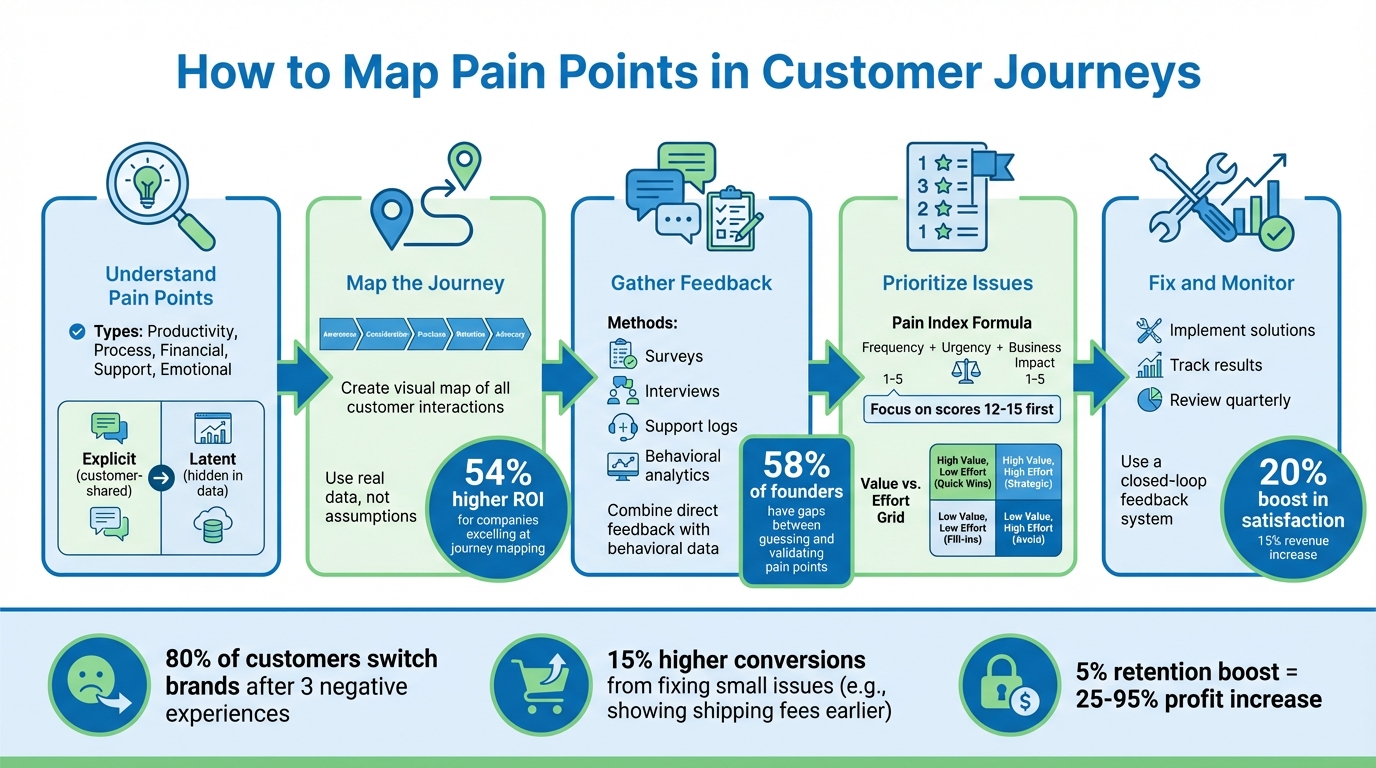
5-Step Customer Journey Pain Point Mapping Process
Customer Journey Map: The Real Reason Your Customers Are Ghosting You
sbb-itb-c53a83b
What Are Customer Pain Points?
Customer pain points are the recurring challenges or obstacles that prevent users from achieving their goals. As Alex Robb, Founder of Launching Next, explains:
"A customer pain point is recurring instances where users fail to complete their task, prompting them to seek alternatives".
These hurdles can appear at any stage of the customer journey - whether during initial research, onboarding, checkout, or long-term service use. If not addressed, they can push customers toward competitors. On the flip side, resolving pain points reduces friction, lowers churn, and increases customer lifetime value while encouraging word-of-mouth referrals.
Common Types of Pain Points
Pain points can take many forms throughout the customer experience. Here are some typical examples:
- Productivity Pain Points: These arise when a product's flaws or poor design slow users down. Think of design software crashing during collaboration sessions or marketing teams wasting hours manually creating reports due to a lack of automation.
- Process Pain Points: Inefficient workflows often create frustration. For example, a fintech company might require users to fill out complex compliance forms during onboarding or repeatedly input the same data across multiple systems.
- Financial Pain Points: Cost-related concerns, hidden fees, or unclear value often deter customers. Imagine discovering unexpected charges during checkout or freelancers hesitating to subscribe due to steep monthly fees.
- Support Pain Points: Poor customer support can be a dealbreaker. Slow response times, unhelpful service, or disorganized resources - like a cluttered knowledge base - leave users feeling stuck and frustrated.
- Emotional Pain Points: These are subtler but no less impactful. Feelings of neglect, anxiety about a product’s future, or lack of trust in a company’s direction can lead to customer abandonment over time.
| Pain Point Category | Example | Journey Stage |
|---|---|---|
| Productivity | Crashing design software during collaboration | Usage/Retention |
| Process | Overcomplicated onboarding forms | Activation |
| Financial | Hidden fees at checkout | Purchase/Revenue |
| Support | Long response times for technical issues | Post-purchase/Support |
| Emotional | Uncertainty due to unclear product roadmap | Retention/Loyalty |
While some pain points are easy to spot, others remain hidden beneath the surface.
Explicit vs. Latent Pain Points
Explicit pain points are the ones customers openly share through surveys, support calls, or interviews. For example, they might say, "I wish this was faster" or "This costs too much." These issues are relatively straightforward to identify because they come directly from customer feedback.
Latent pain points, however, are less obvious. These are uncovered through analyzing user behavior or data. For instance, high drop-off rates on specific pages, frequent abandonment of certain features, or unusually long times to complete simple tasks can all hint at underlying frustrations that customers may not voice directly.
"Customer pain points manifest culturally and via a team's ability to deliver. A good operation should have awareness of these problems and contingencies to maneuver around them."
– Mozhdeh Rastegar-Panah, Senior Director, Product Marketing, Zendesk
Understanding both explicit and latent pain points is essential. Focusing only on direct feedback might address surface-level issues but miss deeper, unspoken concerns. Latent pain points often stem from emotional factors like fear or anxiety, which can heavily influence retention and revenue. By identifying these hidden drivers, you can better map out and improve every stage of the customer journey.
How to Map the Customer Journey
Customer journey mapping is a visual tool that tracks every interaction a customer has with your brand - from the moment they first hear about you to becoming loyal advocates. It highlights smooth transitions and friction points, giving you a clear picture of where customers might face challenges. Instead of guessing where problems lie, this method allows you to pinpoint pain points at each stage.
Vinay D from Ingest Labs puts it this way: "A customer journey map turns fragmented customer interactions into a clear, measurable view of how people move from awareness to long-term loyalty". And the results speak for themselves - companies that excel in journey mapping see a 54% higher ROI on their marketing efforts. Even better, optimizing the entire journey can lead to a 20% boost in customer satisfaction and a 15% increase in revenue.
The most important part? Basing your map on real customer data and behavior. As Ingest Labs warns, "The biggest mistake teams make is creating maps based on internal assumptions about customer behavior. Reality often surprises you, and those surprises contain your highest-value opportunities". A comprehensive map should cover five key stages: Awareness (how customers find you), Consideration (their research process), Purchase (the transaction itself), Retention (ongoing support and engagement), and Advocacy (referrals and reviews).
Once you've outlined the stages, dive into the details of every customer interaction to uncover hidden friction.
List All Customer Touchpoints
Start by identifying every interaction customers have with your business. This includes digital touchpoints like your website, social media ads, emails, and chatbots, as well as offline interactions such as phone calls, in-store visits, physical mail, confirmation messages, and even error pages. These "hidden" touchpoints often reveal problems that surveys might overlook. Mapping both online and offline interactions helps you uncover the full scope of customer friction.
For example, a national electronics retailer found that 22% of BOPIS orders (Buy Online, Pick Up In Store) were incomplete. The mapping process revealed that 60% of these failures were due to misplaced products. By introducing a mobile alert system, they reduced abandoned orders by 12%, recapturing $3.1 million annually.
Don’t just focus on the good moments. Include the times when things go wrong - like failed promo codes, abandoned carts, or long wait times. A regional apparel chain noticed a spike in abandoned carts during a promotion in early 2026. Their mapping revealed that 18% of promo codes failed at checkout because of system lags and incomplete coupon uploads. Fixing this issue reduced cart abandonment by 7% and added $900,000 to monthly sales.
To ensure accountability, assign an internal owner to each touchpoint so someone is responsible for addressing issues as they arise.
Build a Visual Journey Map
Once you've identified all the touchpoints, it's time to create a visual representation of the journey. Organize the touchpoints chronologically across the five journey stages. Use a grid or flowchart format to show what customers do, think, and feel at each stage. Adding color codes for emotions - like excitement, frustration, or confusion - can help stakeholders quickly spot areas where trust breaks down or anxiety spikes.
You don’t have to start from scratch. Platforms like Miro, Lucidchart, and HubSpot offer ready-made templates to speed up the process. For more advanced needs, tools like UXPressia or Smaply provide persona templates and customer experience features. If you need to connect digital analytics with physical operations, Adobe Journey Optimizer can link POS systems, loyalty programs, and online behavior.
Take the time to experience the journey yourself. Sign up for your own email list, browse your website, contact customer support, and make a purchase. As Giift explains, "A journey map isn't truly complete until the customer path has been experienced firsthand. This hands-on approach often reveals subtle friction points that data might overlook".
Don’t stop at external interactions. Map internal processes as well to uncover hidden bottlenecks. This service blueprinting approach can reveal how delays in ticket routing or inventory issues create customer-facing problems. LatentView Analytics emphasizes, "Customer journey mapping in retail is not about drawing pretty diagrams. It is about surfacing where operational complexity, legacy integration, and real-world constraints smash into the customer experience".
Finally, treat your map as a living document. Review it quarterly or after major product launches to ensure it stays aligned with current customer behavior. As your business changes, so will your customers' needs and expectations.
Collecting and Analyzing Customer Feedback
Creating a journey map without real customer feedback is like navigating without a compass - it can lead you astray. In 2025, 58% of founders acknowledged a gap between guessing at customer pain points and actually validating them. This disconnect often results in features that fail to make an impact.
Alex Robb, Founder of Launching Next, puts it succinctly:
"A customer pain point is a repeatable moment where your target user cannot finish the job they came to do and the friction is strong enough that they go look for another way".
True pain points are those recurring frustrations that show up consistently in interviews, support tickets, and analytics. To uncover these, you need to tap into a mix of feedback channels, capturing both direct complaints and subtle signals.
Ways to Gather Feedback
To truly understand your customers, combine direct questions with observations of their behavior. For example, short, in-app surveys during key stages of the user journey can capture immediate thoughts without interrupting their flow. Keep these surveys brief - surveys with more than 10 questions often see a sharp decline in both completion rates and the quality of responses.
One-on-one interviews are another powerful tool for uncovering hidden issues. A great framework for these interviews is the "Four Fs":
- First: Ask about the last time the problem occurred to get a clear, real-world example.
- Finest: Explore their best experience to understand what "success" looks like.
- Failure: Pinpoint where things went wrong in their process.
- Future: Ask how they’d benefit if the issue were resolved to gauge its importance.
Instead of asking, "Would you use this feature?" a better approach is, "When was the last time you tried to do X, and what made it difficult?" This focuses on past behavior, which is often a more reliable indicator than future intent.
Other valuable sources of feedback include support tickets, chat logs, and sales call notes, which can highlight recurring technical issues or friction in the buying process. Public sentiment analysis - looking at organic conversations on platforms like Reddit, social media, or review sites like G2 and Capterra - can also surface pain points that users might not share directly. Even your help center can be revealing; search terms that yield "no results" can point to gaps in your product or documentation.
Behavioral analytics tools, such as heatmaps and session recordings, can help uncover silent frustrations. For example, "rage clicks" or drop-offs in key funnels often signal areas where users struggle.
Key Metrics for Identifying Pain Points
Once you've gathered feedback, metrics can help you separate minor annoyances from larger, systemic issues. For example:
- Net Promoter Score (NPS): A reliable way to measure customer sentiment and loyalty.
- Cart Abandonment Rate: A high rate might point to hidden fees, a complicated checkout process, or missing payment options.
- Bounce Rate: Elevated bounce rates often signal issues like slow loading times, irrelevant content, or poor initial impressions.
- Session Duration: Short sessions may indicate confusion, while unusually long visits to help articles could suggest inadequate documentation.
To prioritize which issues need immediate attention, you can create a Pain Index. Score each pain point from 1 to 5 across three dimensions: Frequency (how often it happens), Urgency (its impact on time or money), and Strategic Fit (alignment with your business goals). Add these scores together - anything scoring 12 to 15 should be addressed first. Avoid using a middle score to ensure clear distinctions between minor issues and critical problems.
In the same 2025 survey, 32% of founders reported user complaints about wasted time or productivity, while 26% highlighted messy processes or onboarding challenges. Another 21% noted problems stemming from insufficient help or documentation. Segmenting this feedback by factors like company size, user experience level, or willingness to pay can help you zero in on the most valuable areas to improve. As PainOnSocial aptly puts it:
"People are better at describing their pain than designing your product".
Using Behavioral Analysis to Find Root Causes
Behavioral analysis goes beyond identifying pain points - it helps uncover the deeper issues causing customer friction. Spotting the symptoms, like a surge in support calls, is just the beginning. The real challenge is figuring out why those problems exist. For example, if customers are flooding your support team with calls, the root issue might be something like a confusing password reset process. Fixing that process could eliminate the need for those calls altogether. Companies that leverage journey analytics to tackle these root causes resolve customer experience issues 25% faster.
Methods for Root Cause Analysis
One powerful tool for uncovering root causes is customer journey workshops. These workshops go beyond surface-level feedback and dive into the emotional triggers behind customer frustrations. Nick Sargent from Standing Partnership highlights their importance:
"Don't think of the journey map as a product. When collaborating with customers, have them select the most challenging pain point and work together to design an ideal solution".
Your front-line staff can also provide critical insights since they directly witness where customers struggle or abandon tasks. Combining their input with data from CRM systems, web analytics, and contact centers creates a fuller picture of the customer journey.
Common Behavioral Patterns to Watch For
Once you've identified root causes, look for recurring behavioral patterns that signal persistent friction points.
- Confusion indicators: Patterns like high checkout abandonment rates, elevated bounce rates, or short session durations often point to unclear or overly complex processes.
- Task inefficiency: If customers frequently abandon certain features, adoption rates remain low, or critical tasks take too long to complete, inefficiency is likely the problem.
- Process redundancy: Forcing customers to re-enter the same information or switch between devices and channels to complete a task often frustrates users and slows them down.
- Support-seeking trends: A high volume of tickets for simple tasks, like password resets, suggests a broken or overly complicated process.
Emotional cues are equally important. Anxiety tends to spike during high-stakes interactions, such as price negotiations or loan applications. Frustration, on the other hand, often stems from slow service or unmet information needs. Mapping these patterns to the AARRR framework (Acquisition, Activation, Retention, Referral, Revenue) helps pinpoint areas that could be blocking growth.
With 80% of customers ready to switch brands after just three bad experiences, addressing these patterns quickly isn’t just helpful - it’s essential.
How to Prioritize and Fix Pain Points
Once you've pinpointed pain points, the next step is prioritizing those that have the biggest impact on keeping customers engaged. Not all issues are created equal - some are minor annoyances, while others can drive customers straight to your competitors. A clear system helps you focus on what truly matters.
Criteria for Setting Priorities
The Pain Index Formula is a practical tool for ranking pain points. It uses a 1-to-5 scale to measure three key factors: Frequency (how often the problem occurs), Urgency (the time or money it costs users), and Strategic Fit (how solving it aligns with your business goals). To avoid indecision, skip neutral scores (like 3) and choose between lower (2) or higher (4) impact. This scoring method not only ranks the issues but also helps guide immediate action.
Another approach uses medical analogies to classify pain points. Minor issues, like "stubbing a toe", are brief and less critical. Chronic problems, like "back pain", are ongoing and can drive customers away. Examples include long support wait times or overly complex ordering processes. These chronic issues should take top priority, as they pose the greatest risk to customer retention.
Once you've scored the pain points, map them on a Value vs. Effort Grid. This helps you identify quick wins (high-value, low-effort fixes) and long-term projects (high-value, high-effort solutions). Lower-value issues can often be addressed through simpler measures like better documentation or automated support, rather than major product changes. This approach ensures that you're tackling the most critical issues first, complementing earlier journey mapping efforts.
With priorities in place, the next step is crafting targeted solutions to address the most pressing pain points.
Creating Solutions That Work
The first step in solving a pain point is understanding its root cause. Is it related to productivity, process inefficiencies, financial constraints, support gaps, product limitations, or emotional dissatisfaction? Before dedicating engineering resources, consider whether a guide, process tweak, or pricing adjustment might solve the problem. As Alex Robb, Founder of Launching Next, puts it:
"Pick one urgent pain and make it faster to solve than the current workaround. Everything else in their company supports that one choice".
For example, an insurance company using the XEBO.ai platform identified delayed claim settlements and impersonal communication as major pain points. By leveraging AI-driven predictive analytics, they automated claim settlements and personalized communication. The results? A 30% boost in customer satisfaction, a 40% reduction in claim handling time, and a 25% increase in policy renewals. This highlights how addressing high-impact pain points with specific solutions can lead to measurable success.
After resolving a high-priority issue, follow up with the customers who flagged it. Invite them to test the solution - this not only builds loyalty but also ensures the fix is effective. Track metrics like task completion rates, time spent on tasks, and support ticket volume post-implementation to confirm the changes are delivering the desired results.
Monitoring Results and Making Improvements
Once you've tackled a pain point, the work doesn’t stop there. Continuous monitoring is key to keeping customers happy over the long haul. Customer preferences and behaviors can change quickly - what worked a few months ago might not cut it today. As Ingest Labs puts it:
"Journey maps are living documents, not one-time projects".
Regularly revisiting and updating these maps pays off. Companies that do so report a 54% higher ROI on their marketing efforts compared to those that don’t.
Set up quarterly reviews to stay ahead of these shifts. Bring together teams from marketing, sales, product, and support to ensure every touchpoint is covered [19, 27]. These meetings can uncover issues before they spiral. For instance, a retail company found that 40% of their support calls were about password resets. By introducing a self-service option, they reduced those calls by 30% in just two weeks. Beyond these reviews, automation can take your monitoring efforts to the next level.
Leverage Automation for Faster Responses
Automated tools can alert you to issues in real time. By integrating analytics platforms with tools like Slack, you can track critical metrics - such as bounce rates, time on page, conversion rates, churn, and customer satisfaction (CSAT) - across every stage of the customer journey [26, 28]. Post-interaction surveys, like CSAT and NPS, can provide immediate feedback after a purchase or support interaction [8, 28].
Before making major changes, validate your ideas with A/B testing to ensure your solutions work as intended. Data-driven tweaks, such as removing confusing UI elements, have been shown to increase conversion rates by as much as 500% in some cases. After implementing changes, regularly audit your data collection methods to avoid biases, like only surveying satisfied customers or falling into confirmation bias traps.
Close the Feedback Loop
Don’t stop at fixing problems - let customers know about the improvements. Sharing updates with both customers and internal teams helps build trust and keeps everyone aligned [26, 28]. This effort is critical, especially when you consider that 80% of customers will jump ship to a competitor after just three bad experiences. On the flip side, improving retention by even 5% can boost profits by anywhere from 25% to 95%.
Conclusion
Customer journey mapping isn’t just a one-and-done task - it’s an ongoing process that pays off in big ways. Businesses that regularly update their journey maps report up to 20% higher customer satisfaction and can see revenue increases of 10-15%. The process itself is straightforward: start by defining your scope and personas, map out every touchpoint, collect feedback from all channels, align customer emotions with their actions, identify pain points, and prioritize fixes based on their potential impact. These efforts can lead to real financial and reputational growth.
Here’s something to consider: 80% of customers believe that the experience a company provides is just as important as the products they sell. And even small improvements can have a big impact - just a 5% boost in customer retention can translate to a 25% to 95% increase in profits.
The best way to start? Pick one touchpoint, gather data, identify an issue, and implement a solution. As FasterCapital explains:
"Customer journey Mapping is not a one-time exercise. It requires ongoing refinement as customer behaviors and expectations evolve".
Every small improvement adds up, creating momentum toward a smoother, more enjoyable customer experience. Let your customers know when changes are made - it builds trust and shows you’re invested in their satisfaction. Each support ticket, abandoned cart, or negative review is an opportunity to learn and improve. The ultimate goal isn’t perfection but constant progress that keeps customers coming back.
FAQs
What’s the fastest way to start mapping pain points?
Mapping customer pain points effectively starts with creating customer journey maps. These maps provide a clear visual of the customer’s experience, making it easier to identify moments of frustration or confusion at various stages - whether it’s during awareness, decision-making, or post-purchase.
To dig deeper, gather direct feedback. Conduct interviews, analyze support interactions, and monitor social media discussions to uncover recurring issues customers face. Once you’ve identified these pain points, prioritize them by tagging and scoring their impact. This way, you can focus on the problems that have the biggest influence on growth.
How can I uncover hidden pain points without more surveys?
To find hidden pain points without relying on extra surveys, dive into behavioral analysis and customer journey mapping. By examining how customers interact and behave, you can spot unspoken problems that might not come up in direct feedback. Mapping out the customer journey helps pinpoint areas where friction occurs or where emotional responses are triggered. Additionally, posing thoughtful, high-level discovery questions during conversations can reveal deeper challenges, giving you insights that go beyond what customers explicitly share.
Which pain points should I fix first for the biggest impact?
To create the most meaningful change, focus on resolving the most pressing pain points - those that are causing significant customer dissatisfaction or leading to drop-offs during crucial stages like purchasing or retention. Tools like customer journey mapping, feedback analysis, and behavioral data can help pinpoint these problem areas. Tackling the biggest issues first not only boosts customer satisfaction but also strengthens loyalty and drives growth.