Voice assistants now do more than transcribe meetings. In 2026, I see them helping remote teams turn live conversation into notes, tasks, translations, and system updates. But the main question is simple: can you trust the output enough to use it without creating data or compliance problems?
Here’s the short version:
- Meeting tools now work live, not just after the call
- Speech-to-text is stronger, but overlap, noise, and bad mic setup still lead to errors
- Multilingual meetings are easier, though complex translation can still take about 90 seconds
- Automation saves time, but task and record changes still need human checks
- Governance is the deal-breaker, especially for access, approvals, and audit trails
A few numbers stand out:
- Typical remote meeting transcription reliability can sit around 80%–85%
- Overlapping speech can drop reliability to 60%–70%
- Noisy audio can fall below 50%
- AI agents can save about 2.5 hours of manual research
- Bad agent loops can cost $1,000 to $2,500 per incident in token spend
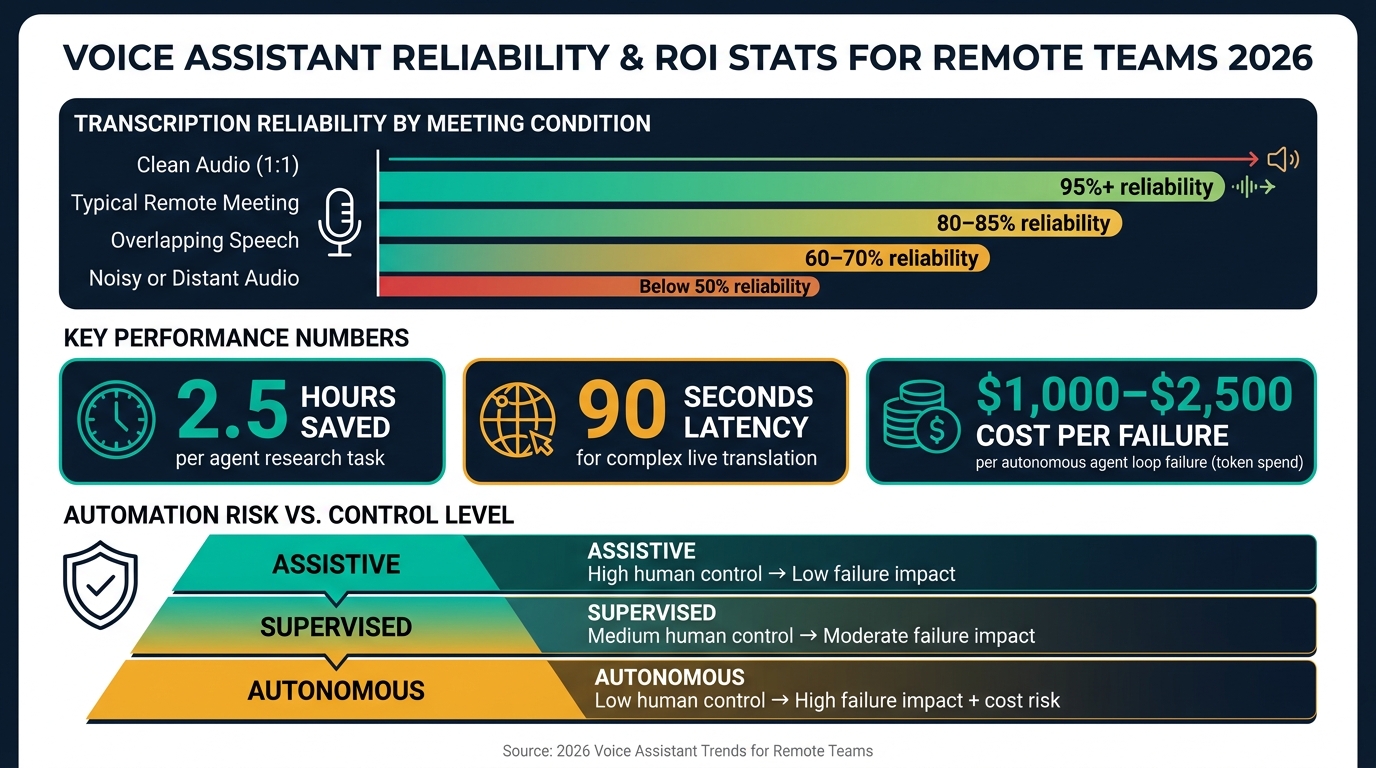
Voice Assistant Reliability & ROI Stats for Remote Teams 2026
Quick Comparison
| Area | What changed in 2026 | Main risk | What I’d check first |
|---|---|---|---|
| Meeting tools | Live notes, summaries, and task logging during calls | More exposure to spoken data | Access rules and transcript permissions |
| Speech-to-text | Better context handling in longer meetings | Wrong speakers, missed details, bad jargon handling | Review action items and decisions |
| Multilingual support | Near-live translation for global teams | Errors with idioms and high-stakes language | Bilingual review for legal or pricing topics |
| Automation | Meeting output flows into CRM, docs, and tasks | Wrong updates, loops, and extra spend | Approval gates and logs |
| Governance | More focus on who can view, edit, and approve | Data leaks, weak review steps, compliance issues | Ownership, exclusions, and correction process |
If I were rolling these tools out to a remote team, I’d start small: use them for notes and follow-ups first, then add workflow actions only after access, review, and logging rules are in place.
sbb-itb-c53a83b
Meeting Software Now Adds Real-Time Voice Intelligence
In 2026, meeting platforms do more than record calls. They listen, write, and act while the meeting is still happening.
Live transcription, live summaries, and instant action-item capture now run during the session itself. Decisions and handoffs no longer sit buried in a recording that someone has to replay later. They show up in the moment. And that leads to the next issue: how accurate are these live outputs when meetings get messy, fast, or unclear?
From Recordings to Live Notes and Action Items
The shift is bigger than it sounds. Meeting platforms now flag escalations and missed details in real time. That changes the flow of work.
Instead of ending a call and then sending a string of follow-up messages to sort out who owns what, the AI logs action items live and assigns them right away. In plain terms, managers spend less time scribbling notes and more time checking what the system picked up. They move from note-takers to reviewers.
Documentation Gains vs. Governance Needs
The time savings are clear. So are the risks.
Real-time voice intelligence handles data as people speak, which brings up instant concerns about PII, transcript access, and who gets to see what. The tradeoff is straightforward: more speed means more exposure, and that means more governance work.
The table below shows how the three generations of meeting documentation compare across the areas that matter most for remote teams:
| Feature | Recording | Automated Transcription | Live Intelligence |
|---|---|---|---|
| Timing | Post-meeting review | Post-meeting processing | Live, during the session |
| Outputs | Video/audio file | Static text transcript | Live notes, instant action items, summaries |
| Human Effort | High (manual note-taking) | Medium (editing transcript) | Low (supervising AI-captured items) |
| Accessibility | Low (requires re-watching) | Medium (searchable text) | High (live captions, instant handoffs) |
| Risk | Low (storage security) | Medium (data privacy/PII) | High (real-time data processing/governance) |
Before rollout, SMEs should set clear rules for transcript access, ownership, and which workflows are safe to automate. As Peshev notes, "The starting point is knowing which workflows are actually proven before you point a model at them." That matters even more when the same meeting output also feeds translation and automation.
Speech-to-Text Has Improved, but Meeting Conditions Still Drive Reliability
A clean transcript is only the starting point. What matters is whether the system assigns the right speaker, records commitments, and matches what the meeting actually decided.
What Improved in 2026
Even with live meeting tools, transcript quality still shapes whether the output can be trusted. By 2026, speech-to-text is strong enough for routine meeting capture, but accuracy still slips when the context gets messy. Models now hold onto meeting context better across longer sessions.
Why Real Meetings Still Produce Errors
The main risk comes from the meeting itself, not just the transcription engine. When people talk over each other, the mic is far away, or the audio is noisy, error rates go up. That can lead to misheard jargon, speaker mix-ups, missing details, and other output problems.
As meeting conditions get less controlled, reliability drops:
| Meeting Condition | Expected Reliability | Common Failure Modes | Recommended Review Level |
|---|---|---|---|
| Clean Audio (1:1) | High (95%+) | Minor punctuation or formatting errors | Spot check for specific names |
| Typical Remote Meeting | Moderate (80–85%) | Misheard jargon, incorrect speaker attribution in quick exchanges | Standard review of action items |
| Overlapping Speech | Low (60–70%) | Merged sentences, attributed quotes to the wrong participant | Manual verification of key decisions |
| Noisy or Distant Audio | Very Low (<50%) | Invented details, significant omissions, loss of context | Full manual review required |
Where Human Review Is Still Necessary
For financial approvals, legal reviews, and other sensitive decisions, a person still needs to verify the record. Transcripts work well for routine notes, but they should not be treated as the final word when there’s operational or legal risk on the line.
"AI has made data verification more important than ever."
- Mario Peshev
The good news is that this review step doesn’t have to take long. A fast human pass can catch major errors in about five minutes.
Once transcription is dependable, the next limit is language coverage.
Multilingual Support and Workflow Automation Expand the Use Case
Multilingual Meetings Move Toward Live Translation
As transcription gets more dependable, the next bottleneck is language. In 2026, voice assistants can support cross-language meetings with live transcription, translation, speaker attribution, and follow-through.
Live translation is getting close to real time, though it still takes about 90 seconds for complex exchanges. That’s a big deal for global teams. It means multilingual meetings are far more workable without pushing everyone into a separate localization process.
Still, some parts need a human eye. Idioms, casual expressions, and other hard-to-predict phrasing can still trip these systems up. And when the stakes are high, that matters. For contracts, pricing, or compliance, a bilingual reviewer should still check the output before anyone shares or files it.
| Capability | 2026 Status | Latency / Performance | Human-Verification Need |
|---|---|---|---|
| Transcription | High accuracy; integrated into Slack/CRM | Real-time | Low for clear audio; higher when context is large |
| Live Translation | Moving toward live; supports global hubs | ~90 seconds for complex exchanges | Moderate; needed for idioms and unpredictable phrasing |
| Speaker Attribution | Integrated into tools like Gong/Fathom | Real-time | Low; useful for catching escalations humans miss |
| Follow-up Notes | Automated task creation in HubSpot/Salesforce | Within minutes of the meeting | High; requires validation before finalizing |
Once teams feel comfortable with multilingual output, the same meeting data can move straight into tasks, records, and team systems.
Assistants Turn Meeting Talk Into Tasks and Updates
When meetings can move across languages cleanly, the next step is simple: let the output flow into the tools teams already use. For remote teams, that can turn meeting talk into task creation, CRM updates, and shared docs without the usual copy-paste shuffle.
Voice assistants tied into Model Context Protocols (MCPs) can connect directly to tools like HubSpot, Salesforce, and Google Drive. From there, they can draft follow-ups, create tasks, and assign owners without anyone manually moving information from one system to another.
"Managing the modern GTM stack via chat interfaces is way closer this week than ever."
- Mario Peshev, CEO of DevriX
That time savings adds up fast. Agents can save about 2.5 hours of manual research across multiple platforms and return verified outputs in roughly 90 seconds.
| Automation Type | Approval Requirement | Failure Impact | Auditability | Suitable Remote-Team Scenario |
|---|---|---|---|---|
| Assistive | High (human-led) | Low - task stays undone | High | Drafting follow-up emails, meeting summaries |
| Supervised | Medium (human validation) | Moderate - pipeline block | High (logged changes) | Updating CRM records, creating GitHub PRs |
| Autonomous | Low (post-action review) | High - unexpected usage costs or data leak | Moderate (log review) | 24/7 system monitoring, high-volume outreach |
The biggest risk with autonomous automation isn’t only bad output. It’s also cost. When unmonitored agents get stuck in loops, they’ve produced bills between $1,000 and $2,500 per incident in token usage alone.
A safer path is to start with assistive automation, then add approval gates before expanding further. That’s where governance starts to matter.
What Leaders Should Watch Next
Technology Shifts Likely to Matter Next
After live notes and automated follow-up, the next move is deeper integration. Voice assistants are shifting from simple meeting capture to chat-first voice workflows inside the tools teams already use.
Persistent context should help with recall. But there’s a catch: long context windows can still produce errors. So memory-based retrieval has a place, but leaders should still keep it under human review.
Wearables are pushing voice support beyond the screen too, mostly for alerts and call help. That can save time. But it only works when teams set clear rules for access and review.
Governance Questions SMEs Should Answer Before a Wider Rollout
Before expanding voice assistant use across a team, leaders need clear answers to a few basic questions:
- Access: Which data can the assistant access, and who owns the credentials and permissions behind it?
- Exclusions: Which meetings are excluded because they involve sensitive or regulated information?
- Approval gates: What approval steps are required before the system updates a record, sends a follow-up, or creates a task?
- Correction ownership: When a transcript is wrong, who fixes it, and how are validation steps documented?
Multi-step automations still need approval gates and audit logs.
"The starting point is knowing which workflows are actually proven before you point a model at them." - Mario Peshev, CEO, DevriX
These aren’t just process choices. They shape legal compliance and management accountability. If a team skips ownership, access rules, or review steps at the start, the odds of security breaches or data leaks go up.
Conclusion: Key Takeaways for Remote-Team Decision-Makers
For remote-team leaders, the choice is now less about adoption and more about control. Meeting intelligence, transcription quality, multilingual support, and automation are all moving fast. But the teams getting the best results did the boring part first: they mapped workflows, set clear ownership for each output, and added human checkpoints before they scaled.
Scale voice assistants only after access, review, and audit rules are defined.
FAQs
How should we pilot voice assistants safely?
Start by reviewing your current workflows and looking for processes that already work well and are ready to be automated. Do that first, then decide where models fit.
Skip out-of-the-box agents for public-facing systems or sensitive data. They can introduce security risks and drive up costs fast.
It’s usually smarter to test ideas with internal tools first. Keep human supervision in the loop to check outputs, restart failed pipelines, and handle tasks that still need judgment.
Growth Shuttle can help teams improve processes and operational efficiency during digital transformation.
Which meetings should never be automated?
Meetings that call for judgment, nuance, and plain old human instinct shouldn’t be automated.
That includes new go-to-market efforts, where strategy can shift fast and small signals matter. It also includes messy, non-deterministic work that doesn’t follow a clear, repeatable path.
Automation tends to work best when the process is already tested and stable. Think routine data processing or sprint requirement generation - workflows where the steps are known and the output is easier to predict.
What human checks matter most?
In an AI-first setup, human oversight still matters. Automated systems can hallucinate, stall, or just miss the mark.
That’s why teams need people in the loop for checks like:
- improving prompts when results are weak
- restarting systems that fail
- unblocking pipelines when APIs go down
- checking data sets before they’re used
- reviewing output quality
- managing workflows that need context and judgment
Growth Shuttle helps leaders sort out which workflows are ready for automation and which ones still need manual input.